Upgraded to 2.5.1

April 27, 2008

I really thought I’d wait to see if they had all the bugs ironed out - there were 70 fixed in this upgrade - but then I thought what the hey and upgraded anyway. I’m like that.

I had a hairy moment when all I was getting was a white screen… but then I remembered to overwrite the new default theme and all was well.

Thank goodness.

Although… and this is a bugger… photodropper doesn’t seem to work anymore. :(

Which is why I’ve added this random scene… it makes me feel better.  (And now I can centre photos without mucking around with the code. )

Peppermint Grove at dawn

Wordpress 2.5: don’t be scared

April 1, 2008

There has been quite a lot of talk on forums and in blogs about 2.5 and for those of you who are not on Wordpress it must be getting a bit boring - and people can we move on please! - This, I promise will be my last post on it. Two of two.

So I upgraded last night and this is the first post completely using the new format.

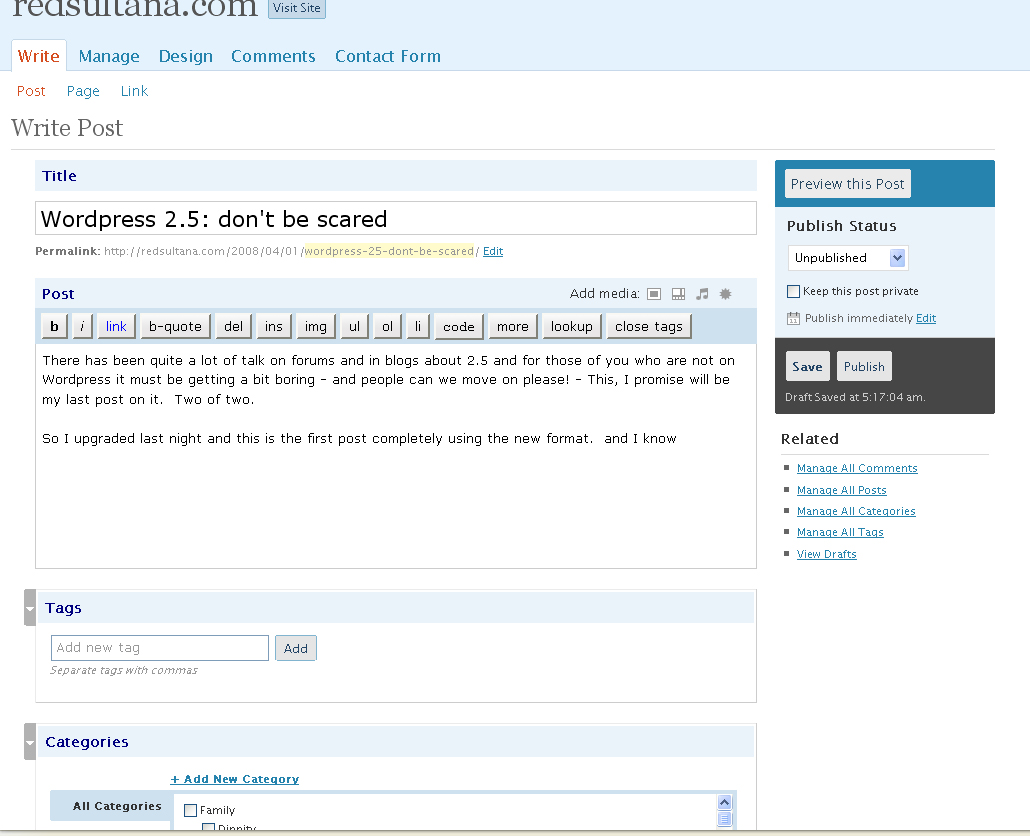
Screenshot of my post as it is being written< /p>

And this view of the screenshot is the first image I’ve uploaded using the new interface which I might say is bloody marvellous with options to do captions and descriptions and to align it in the centre if you wish! (although my theme means that I have to centre manually)

As you can see I’m quite taken with 2.5. As are others.

Apart from the image and gallery functions (untested yet), I like the new layout. I like the webstats on the dashboard, I like the automatic upgrade of the plugins - man that saves some time - I’m lukewarm about the widgets interface - now you have to choose which sidebar you’re looking at - I quite liked having all the sidebars displayed - but apart from that I’m really happy.

Of course there are some who aren’t enjoying the new interface but you can’t please everyone I guess.

To those who say - don’t fix what ain’t broke - I say bah humbug! How boring would life be if we stood still. But then I’m a girl who likes change (as my many theme changes will attest).

But do your homework. Maybe you’d like to wait a little longer. Make sure all the bugs are discovered. Fair enough. You don’t have to upgrade.

If you do want to - the instructions on Wordpress worked really well for me.

Here’s what I did:

  1. Downloaded the new files and extracted them into a folder I could find again.
  2. Disabled plugins
  3. Deleted my wp-includes folder in my FTP program (I use Smart FTP). This took a little while.
  4. Uploaded the new wp-includes folder. Again this took some time.
  5. Deleted my wp-admin folder.
  6. Uploaded the new wp-admin folder
  7. Copied across and overwrote all the files in the root Wordpress directory making sure my wp-config file was not overwritten.
  8. Copied across and overwrote the index.php file in wp-content
  9. Opened a browser and went to wp-admin/install.php and followed the prompts
  10. Went to the plug-in section and activated the plug-ins updating as I went

Piece of the preverbial.

And if the Automatic Upgrade Plug-in works for you - even easier.

Update: More opinions (including mine… again)

Okay enough Geek Speak… normal blogging will resume shortly…

But before I go - and if you’re still reading - you’ll appreciate this little gem.

Upgrading to 2.5 - wish me luck!

March 31, 2008

Taking the plunge into new waters with 2.5.

Normal service will (hopefully) be restored shortly.

UPDATE: Updated. No probs at all.
Now having a play with the new interface. One of the things I love already is the ability of automatically upgrading plug-ins on the plug-in page. Now that is a great feature. :)

Flickr plug-in fix for Wordpress 2.3

October 16, 2007

Brother and SisterFor those of you upgrading to Wordpress 2.3 and also has tantannoodles flickr plug-in…

When I uploaded the new files my plug-in failed. This was very sad for me as I love the ability to add photos to my blog like this one from Melbourne…

But thanks to Metavida it’s working again!

Here’s the quick fix: In the file “silarpartners/flickr/class-admin.php” comment out (add two slashes “//” before) line 209 “add_filter(’uploading_iframe_src’, array(&$this, ‘uploading_iframe’));”

Loving your work Metavida!

Trialling a new theme

October 14, 2007

I’m playing with a new theme (obviously). This one is called Beauty-50… or at least it is a modified version of Beauty-50… I’m still tweaking… not sure about the donkey orchid… not sure about any of it if I’m honest.

I’d be interested in your thoughts.

You’ll also see in the left hand column I’ve got a little RSS feed of a random selection of the people I know have been awarded Community Blogger Awards. You can find a full list too. :)

Upgrading to 2.3 - what went wrong and how I fixed it

October 13, 2007

So I’ve upgraded to WordPress 2.3 and it wasn’t completely smooth but wasn’t too hard either - although there’s been a few tweaks and a couple of plug-ins don’t work yet.

Here’s what I did:

  1. Backed up using mySql then discovered I had Wordpress Backup plugin so backed up with that as well.
  2. Deactivated Sidebar widgets and got:Fatal error: Call to undefined function: register_sidebar_widget() in /home/users/web/b2996/ipw.redsulta/public_html/WordPress/wp-content/plugins/widgets.1.0/nrs_fold_pages.php on line 118Grrrr.
  3. Deleted Widgets 1.0 FTP.
  4. Downloaded 2.3 upgrade files from http://wordpress.org/download/
  5. Hmmm new folder is wordpress, old folder is Wordpress… do I change the name?
  6. Try not changing name first…
  7. Hmmm it didn’t like that… created a new folder rather than overwriting…
  8. Okay try overwriting files into Wordpress…
  9. Upgrade complete but I get this error:Warning: array_key_exists(): The first argument should be either a string or an integer in /home/users/web/b2996/ipw.redsulta/public_html/WordPress/wp-includes/category-template.php on line 176
  10. It’s something to do with the theme. I change from Misty Look to Kubrick and it’s fine. But it’s not my preferred theme.
  11. Look for new compatible theme… download Mandigo - http://www.onehertz.com/portfolio/wordpress/mandigo/testrun/
  12. Find this code at Nathan Rice - http://www.nathanrice.net/blog/wordpress-23-theme-backward-compatibility/ but can’t seem to make this work so giving up on Misty Look theme and instead start searching for another theme to customise!
  13. Ahhh Meg finds me the link to the new version of Misty Look… http://mistylook.org/
  14. But stupidly I overwrite my style page and now my random header doesn’t work. Arghhh. Also half my old sidebar bits are missing…
  15. I’m over Misty Look anyway! So find new theme here.
  16. Have dinner party with friends and have a great time.
  17. Start re-activating plug-ins, updating when they either don’t work or have a little “this plug-in has been updated” note.
  18. The Silas Partners plug-in that used to display my flickr photos has spat itself.
  19. Start “Sultana-ising” Beauty-50… by changing the images and the font colours.
  20. Update this blog and start worrying about my photo plug-in.
  21. It’s 4.02am. Must go to bed.
  22. Found fix for error in photo plug-in but still does not have the ability to drag photos into posts.

Gobsmacked

May 23, 2007

I’m sitting here stunned.

My entire website seems to have disappeared overnight. Apart from this index page.

Last night I changed my template because my old one seemed to be getting slower by the day. When I logged off last night everything was working. Today. Nothing.

Has this happened to anyone before?

Update: I think it might be a problem with my hosting company - iPowerweb - they also seem to be having problems. My fingers and toes are crossed that it all hasn’t been lost forever. :(

Update2: And now I think my database is corrupted. Double Unhappiness!

Update3: Thought for a while my configuration was at fault but no - almost lost the lot - but luckily Moshu saved me. I love Moshu.

Update4: Going to bed and hoping my server has a look at the DB overnight. Fingers crossed!